I upgraded to Kubuntu 13.03, and file transfert is now 15-20Mo/s fast both ways (but sometimes I just get 1Mo/s 🙁 ). Yeah!
Ubuntu 13.03 and Nexus: MTP file transfer now very fast
1 réponse

I upgraded to Kubuntu 13.03, and file transfert is now 15-20Mo/s fast both ways (but sometimes I just get 1Mo/s 🙁 ). Yeah!
Mise à jour de mes impressions quelques mois plus tard.
J’ai acheté il y a 1 an et demi un clavier Bépo (disposition des touches ergonomique et vraiment adaptée au français) de marque Typematrix, puis un deuxième récemment pour le boulot, et voilà le bilan contrasté que j’en fait.
J’ai chargé ma tablette avec le chargeur fourni et un chargeur de téléphone (Samsung Galaxy Spica). Pour passer de de 32% à 100%, il a fallu:
Avec mon téléphone, ça a l’air d’être la même chose.
Voici un simple script Anki2 d’export texte de paquet en ligne de commande que j’ai écrit.
Utilisation: export.py NOM_PROFILE NOM_PAQUET out.txt
Here is a simple text export Anki2 script to be used on command line.
Usage: export.py PROFILE_NAME DECK_NAME out.txt
After a few days of use, I can say that the Nexus 10 is quite a nice device. I was a little bit disappointed that:
Now the good points:
I was a little bit sceptic at first, but I may become one of those who use their computer once in a while. Well, I will still need it to edit my Anki packets, type long emails, edit Openstreetmap, order and edit my photo, write code and things like that, but I have to admit that for the rest (browsing and reading, listening to music, endless watching pointless streaming video) the concept is fantastic (thanks Steve).
Sous Windows, on peut demander à xorg de supporter les claviers français et bépo en le démarrant comme ceci:
/usr/bin/startxwin -- -xkblayout fr -xkbmodel pc105 -xkbvariant "fr,bepo"
Par contre, l’option -xkboptions grp:alt_shift_toggle » ne m’a pas permise de basculer de l’un à l’autre, alors j’ai créé les alias suivants:
alias bepo='setxkbmap -layout "fr" -variant bepo'
alias fr='setxkbmap -layout "fr" -variant oss'
I just bought a Nexus 10, and I realized that transferring file from Linux is now a pain.
Edit 2: With Ubuntu 13.04, MTP started working with transfer rates between 15 and 20Mo/s.
What a disappointment. Amarok tracks notifications are inconsistent depending on the sound back-end: with some of them, the event « new track » is sent twice, and their clients have to deal with it with ugly hack..
In my previous attempt of parsing Openstreetmap data, I found parsing XML data slow. Fortunately I realized that the data was also available in Google Prococol Buffer format, and
There is a Go library to handle Protocol Buffers, so I tried to write a PBF reader in this language and could see how efficient it would be. My program worked like this:
So what kind of performance did I get? I get the best result with a number of workers equal to the number of cores + 1 (so 5 workers): about 28 seconds. I cannot compare this result with Osmosis (not all the cases are handled), but it’s quite acceptable.
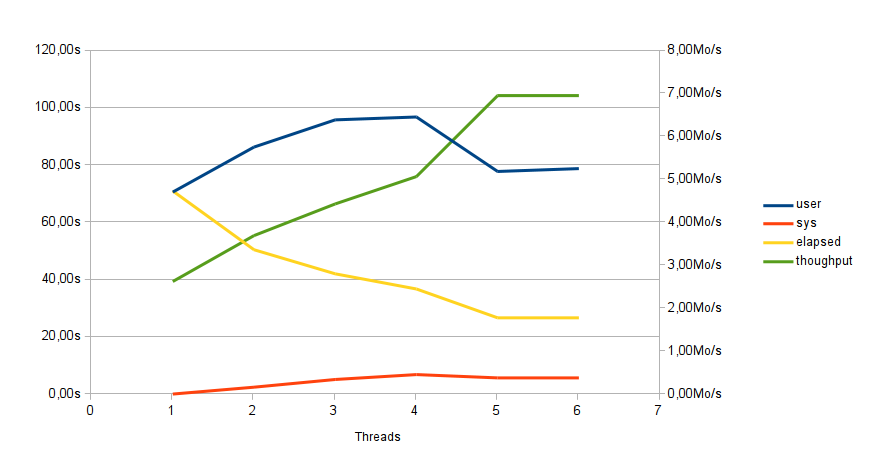
I find Go a nice language to use, and it compiles very very quickly. I struggled a little bit with some points, and everything is not clear yet for me also. It feels strange not to program in a OO-way. And I can’t be sure if I have to trigger tons of goroutines or use a pool of workers, if I should pass callback functions or channels.
That’s also a pity that the tremendous performance is not there yet. It’s supposed to be «close to the metal», «a language for system programming», but for the moment (after 3 years) it is not a fast as Java.
Mise-à-jour: l’association est plus ou moins en sommeil. Les inscriptions sont fermées.
Billet d’origine: « Si le service est gratuit, c’est que vous êtes le produit ». Je cherchais une alternative à Gmail car je n’aime pas:
Mon hébergeur historique, Free, a longtemps eu le défaut honteux de ne pas proposer de communications chiffrées avec ses serveurs (bref, si quelqu’un écoutait le tuyau, il pouvait voir le contenu des communications).
Il existe une alternative: l’hébergement d’e-mail associatif, comme par exemple chez Sud-ouest.org. Pour une modique somme (un prix libre en fait), cette association héberge en toute confidentialité vos courriers.
Attention, leur but n’est pas de stocker tous vos e-mails depuis la nuit des temps (comme sur gmail): vous devez déclarer au préalable la taille de votre boîte mail. J’ai configuré mon lecteur de mail (en l’occurrence Thunderbird) pour laisser sur le serveur les courriers des jours précédents, comme ça je peux consulter ceux qui m’intéressent depuis mon téléphone ou le webmail.
Sud-ouest.org permet d’héberger les mails de son nom de domaine, ce qui permet de changer de fournisseur en gardant son adresse mail. On a aussi accès aux fonctionnalités qu’on peut attendre d’un hébergeur: pop3, imap et smtp chiffrés, anti-spam, webmail. Et pour ma part, ça marche très bien depuis des mois.